
Remote Attacks

2 Player Raid Tycoon Attack Menu and Strike Requirements

Last updated:

Use Attack to choose a player and send a remote strike. The launch option you can use depends on the selected attack, target protection, terminal readiness, and any listed facility or Rebirth requirements.

Quick Answer Overview

Open Attack, select AIRSTRIKE, choose a player with TARGET, then select LAUNCH – $250K and confirm. A cash Predator Missile requires Rebirth 7, a Nuclear Silo, and $2,000,000. SHIELD protects the target, while READY IN counts down terminal readiness. When an incoming strike warns you to RUN, move away from the marked area. After death, the limited-time AIRSTRIKE revenge option opens a Robux purchase.

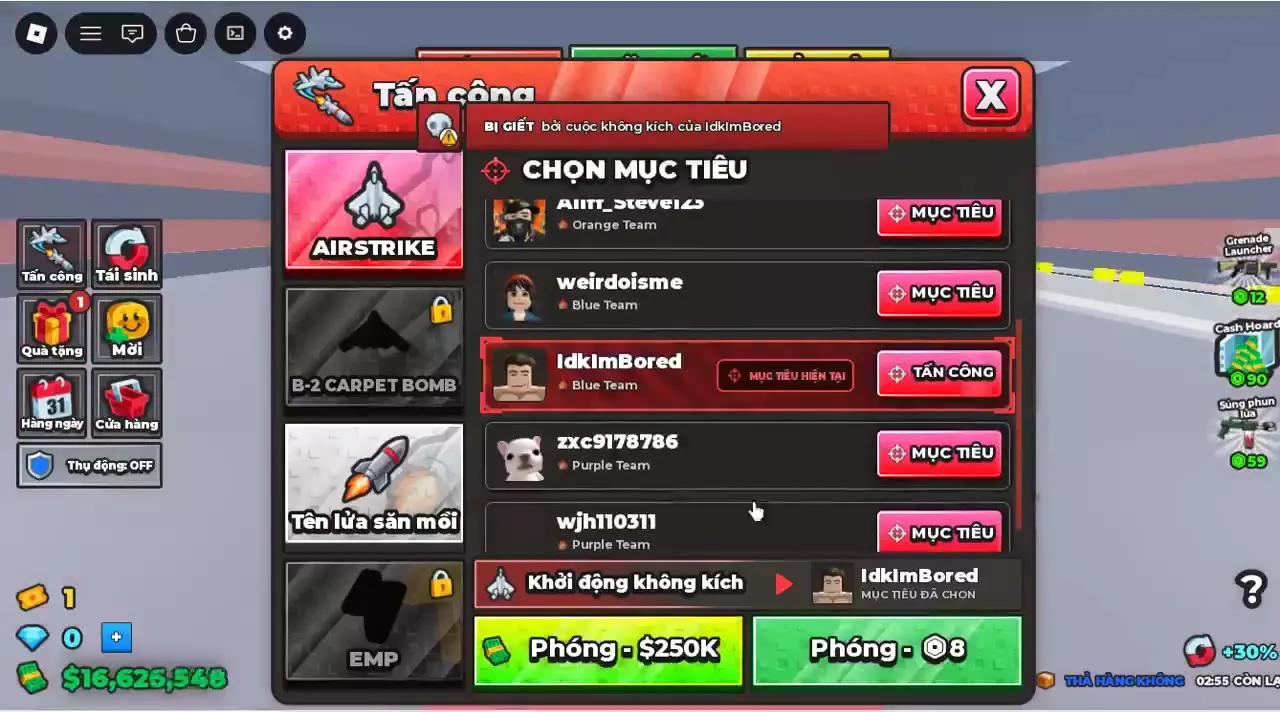
Airstrike target selected in the Vietnamese Attack menu, with separate $250K cash and 8 Robux launch buttons.

Attack Options and Facility Requirements

Airstrike is the straightforward choice for a targeted cash attack. Predator Missile adds manual guidance and damage to floors along its path, with higher cash and progression requirements.

The B-2 Carpet Bomb panel lists a 59 Robux launch offer alongside a separate LOCKED button. The EMP panel lists 75 Robux while also displaying COMING SOON; that price is not an indication that EMP is ready to use.

Where to find the facilities

  • Airstrike Uplink: a $2,000,000 purchase pad on the rooftop near the Helipad area. This is the facility purchase price, separate from the cost of a strike.
  • Bomber Uplink: a Rebirth 6 base unlock, listed under BASE UNLOCKS and marked by a yellow pad inside the base.
  • Nuclear Silo: the launch site and required facility for a cash Predator Missile.

Use the building and facility directory for other base locations.

Remote Attack Types
NameTypeCash launch costRobux launch offer
Airstrike
Targeted airstrike
250000 cash (Cash launch available)
8 Robux (Vietnamese Attack interface)
16 Robux (English menu and rooftop terminal with LAUNCH NOW 16)
19 Robux (English menu, purchase dialog, and terminal with LAUNCH NOW 19)
Predator Missile
Manual strike
2000000 cash (Computer terminal with the cash LAUNCH option available)
30 Robux (Attack menu or terminal displaying LAUNCH NOW 30)
25 Robux (Terminal displaying LAUNCH NOW 25)
B-2 Carpet Bomb
Carpet bomb
—
59 Robux (Attack menu displaying LAUNCH CARPET BOMB)
EMP
EMP menu option
—
75 Robux (Menu simultaneously displays COMING SOON)

Airstrike

Free launch uses
1 use (Terminal displays LAUNCH NOW FREE X1)
Available purchased uses
1 use (Example account with a purchased, unused Airstrike)
Terminal readiness countdown
60 seconds (READY IN display immediately after the cash launch in the 19 Robux terminal interface)
Terminal countdown example
52 seconds remaining (After a cash launch at the terminal offering LAUNCH NOW 16)
Target shield countdown
180 seconds (Immediately after cash launches in the Vietnamese Attack interface)
Shield restriction
A protected target displays a shield countdown; the selected target's cash-launch action becomes gray.
Incoming warning
Names the attacker and displays INCOMING and RUN; a red ground circle can accompany it. (Player targeted by an incoming Airstrike)
Indoor danger
Can kill a player inside the factory beside the production conveyor.

Predator Missile

Required Rebirth
7 rebirths (Cash launch)
Control
Manually steer the missile toward an enemy base.
Floor damage
Damages each floor it passes through.
Hit feedback
Missile hits trigger hitmarkers.
Requires for cash launch and launches from
Nuclear Silo
Requires Rebirth level
7 × Rebirth (Cash launch)

B-2 Carpet Bomb

Target selection
Uses the selected player; switching from Airstrike can retain that target.
Locked launch option
A separate launch button displays LOCKED alongside the 59 Robux offer. (LAUNCH CARPET BOMB panel)
Menu icon
Flying-wing bomber

EMP

Menu status
COMING SOON (LAUNCH EMP panel with the 75 Robux offer)
Target selection
Uses a player target list and displays CHOOSE A TARGET when no target is selected.
Tab state
Lock icon (Interfaces showing EMP as a dark silhouette)
Menu icon
Yellow lightning bolt with a blue selected background (Selectable EMP panel)
Remote Attack Facilities
NameTypePurchase costRequired Rebirth
Airstrike Uplink
Airstrike facility
2000000 cash
—
Nuclear Silo
Missile launch facility
— —
Bomber Uplink
Base unlock
—
6 rebirths
Location
Rooftop purchase pad, near the Helipad area
Rebirth menu condition
Listed as an ownership condition, changing from NOT YET to OWNED. (Rebirth 0 interface listing Airstrike Uplink before the first rebirth)
Ownership listed as a condition for
Rebirth (First-rebirth interface that specifically lists AIRSTRIKE UPLINK)

Nuclear Silo

Purpose
Launch site and facility requirement for a cash Predator Missile launch.
Provides launch site for
Predator Missile
Location
Yellow unlock pad inside the base; also listed under BASE UNLOCKS.
Requires Rebirth level
6 × Rebirth

Select a Target and Launch an Airstrike

Have $250,000 cash and an available cash-launch button before starting.

  1. Open Attack from the left side of the screen and select AIRSTRIKE.
  2. Scroll through the player list and press TARGET beside the player you want to attack.
  3. Check the player's name and team. The selected row is highlighted, and the player also appears in the launch panel.
  4. Select LAUNCH – $250K.
  5. Check the target and fee in the confirmation dialog, then confirm.
  6. Look for the launch notification and $250,000 deduction. A later notification can report that the target was downed.

Switching from Airstrike to B-2 Carpet Bomb or EMP can retain the selected player. Recheck the target name after changing tabs.

Robux and available-use options

To pay with Robux, select your target and choose the Robux launch button. In the interface with an ATTACK button on the selected player's row, that button opens the Airstrike purchase dialog.

Offers differ by interface: the Vietnamese Attack menu lists 8 Robux, while English menus and rooftop terminals include 16 or 19 Robux offers. Read the item price in your purchase dialog. A 400 Robux / $4.99 top-up is a currency bundle; in the dialog offering a 19 Robux Airstrike, $4.99 is not the strike price.

If the rooftop terminal displays LAUNCH NOW FREE X1, it offers one free launch alongside the cash option. An unused purchased Airstrike can also remain available for a later target. A displayed use count is a limited available use, not unlimited free attacks.

Airstrike target selected in the Vietnamese Attack menu, with separate $250K cash and 8 Robux launch buttons.

Read SHIELD, READY IN and LOCKED

Read the message beside the target or launch action to identify what is stopping the strike.

Message Meaning What to do
CHOOSE A TARGET No player is selected; launch buttons can remain gray. Select a player with TARGET.
SHIELD The player has target protection. Their row shows a countdown, and the selected target's cash-launch action becomes gray. Wait for protection to expire or choose another available target.
READY IN The terminal is counting down until another normal launch is ready. Wait for the terminal countdown to finish.
LOCKED That particular launch option is locked. Read any requirement listed in the panel; a separate Robux offer can appear beside it.

After a cash Airstrike in the Vietnamese Attack interface, the target row and cash button change to Khiên 3:00, a three-minute target shield. At the Airstrike terminal with the 19 Robux LAUNCH NOW offer, the readiness countdown starts at 60 seconds after a cash launch. These are separate timers: one belongs to the target, the other to the terminal.

A Robux button can remain green beside a restriction. Do not treat its color as permission to bypass a shield, cooldown, or facility requirement.

Predator Missile Cash Requirements

A cash Predator Missile launch requires all three:

  • Rebirth 7.
  • A Nuclear Silo.
  • $2,000,000 cash for the launch.

Select PREDATOR MISSILE in Attack to see its MANUAL STRIKE description and REQUIRES REBIRTH 7 requirement. The base computer terminal displays REQUIRES NUCLEAR SILO when that facility requirement is unmet. The $2,000,000 amount is the launch cost, not the silo's construction price.

You manually steer the missile toward an enemy base. It launches from the Nuclear Silo and damages each floor it passes through; missile hits trigger hitmarkers. Choose it when you want a manually directed attack through a base's floors and can meet the higher cost and prerequisites. Airstrike is the simpler cash option when your goal is to attack a selected player.

The Attack menu and some terminals offer LAUNCH NOW – 30 Robux; a separate terminal offer is 25 Robux. Use the amount displayed on your own launch panel rather than treating either as a universal price.

For the progression needed to reach this milestone, see the Rebirth requirements and unlocks guide.

React to an Incoming Airstrike

An INCOMING warning names the player calling the Airstrike and tells you to RUN. Move promptly. If a red circular marker appears near your character, move away from the marked area.

Being inside your factory does not protect you from the blast: Airstrikes can kill players beside the production conveyor. Keep moving away from the danger cue instead of relying on the roof overhead.

If the strike kills you, the death notification can name the attacker's Airstrike as the cause. After respawning at your base, use the available revenge entry or open Attack to select a counterattack. For broader preparations against raids, see base defense and Passive Mode.

Use Revenge After Death

Use the revenge entry beneath the notification naming your killer while it is still available. Some death interfaces show a single red REVENGE button; others offer AIRSTRIKE and MISSILE, sometimes with BOMBER as another choice. The decreasing number beside these buttons is the remaining selection time, not a price.

To send an Airstrike through the death-screen purchase:

  1. Select AIRSTRIKE beneath the killer notification.
  2. Check the Revenge Strike purchase dialog and its payable price. With Saving 3 with Plus, the price is 16 Robux, reduced from 19 Robux.
  3. Select Buy to complete the purchase.
  4. Look for the notification that an Airstrike has been sent toward your killer.

If the revenge target leaves, the revenge strike is saved instead of being wasted.

To retaliate with cash after respawning, use the normal Airstrike launch steps: open Attack, select your killer, and confirm the $250,000 cash option. This is separate from the death-screen Robux purchase.