
Rotating Events at a Glance
Choose Air Drops when you want to find and open a crate, King of the Hill for a flag-point fight, Oddball for a carry-and-survive objective, or Double Cash for a temporary cash boost.
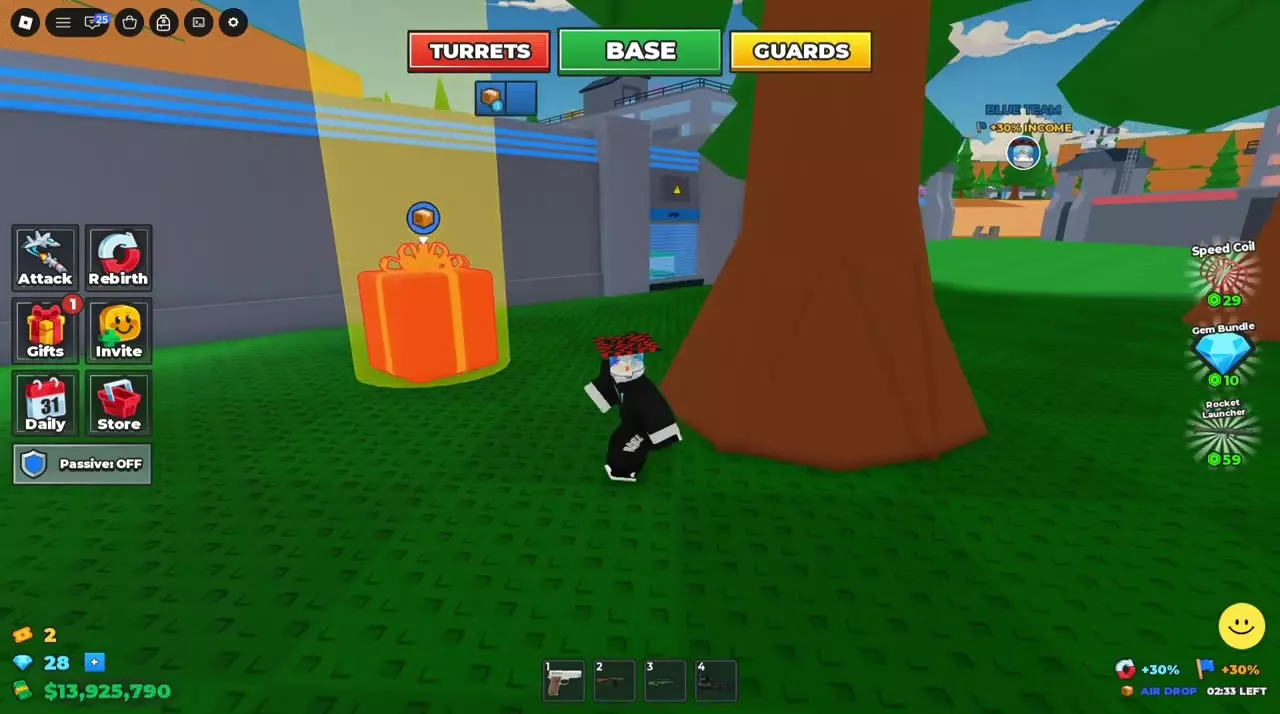
- Air Drops: Follow the floating crate icon and yellow landing beam. Opening a landed crate awards cash based on your own income.
- King of the Hill: Contest the central flag platform. A successful capture gives the team an income bonus; read the percentage shown in the capture notification or HUD.
- Oddball: Follow the purple ball marker and hold the ball for your team when the timer ends. A win awards an income-scaled prize.
- Double Cash: Watch for the event name and countdown to use the limited-time cash boost.
| Name | Objective |
|---|---|
| King of the Hill |
Contest the central flag point
|
| Oddball |
Hold the ball for your team when the timer ends
|
| Double Cash |
Limited-time cash boost
|
| Air Drops |
Find and open supply crates
|
King of the Hill
- Location
-
Raised outdoor stone platform with steps, low walls and a circular flagpole base
- Capture
-
Remain near the circular flagpole base until your team's flag and capture notification appear
- Neutral state
-
White flag and UNCLAIMED (The previous team has lost the flag and a new capture is not yet complete)
- Income bonus
-
30 % (Captures displaying +30% income)50 % (Captures displaying +50% income)
- Capture confirmation
-
Team-colored flag, captured the flag banner and flag income icon
- Platform cover
-
Use the low walls for cover and aim through openings when the wall obstructs your scope (Fighting around the flag platform)
- Grants an income bonus
- Cash (Use the percentage displayed for the team's capture)
Oddball
- Ball appearance
-
White glowing ball with a pink halo
- Pickup location
-
Gray circular platform inside a passage between orange ramps, reached by following the purple ball marker (Orange-ramp pickup route)
- Carrier indicators
-
Ball above the carrier's head, pink-purple highlight, CARRYING ODDBALL and SURVIVE countdown (While carrying the ball)
- Opponent indicator
-
Banner naming the carrier and a KILL marker with a countdown (Another player holds the ball)
- Actions while carrying
-
Move through the factory and outdoors while using a gun (While carrying the ball)
- Reward basis
-
Seconds of the player's own income, scaling with factory progression (Income-scaled prize rules)
- Awards an income-scaled prize
- Cash (Winning Oddball)
Double Cash
- Cash boost
-
2 × (Double Cash event)
- Start indicator
-
DOUBLE CASH IN countdown followed by a start banner
- Active indicator
-
Event name and remaining-time display (While the event is active)
- Provides a temporary cash boost
- Cash (During Double Cash)
Air Drops
- Location marker
-
Yellow landing beam and a floating crate icon (Ground supply drop)
- Landing indicator
-
SUPPLY DROP has landed (The crate reaches the ground)
- Open crate
-
Approach the landed crate and hold E at Open supply drop until the progress circle completes (Desktop controls)
- Reward basis
-
Supply Drop cash prizes scale with factory progression as seconds of the player's own income (Income-scaled prize rules)
- Directs players to collect
- Supply Drop (During the Air Drop event)