
Turrets

How to Build and Use Turrets in 2 Player Raid Tycoon

Last updated:

Getting a turret ready involves separate tower construction, installation, and equipment choices. Once it is installed, you can set its defense order or climb up and take control yourself.

Quick Answer Overview

Buy the $75,000 TURRET TOWER, climb its outside ladder, and buy the separate $150,000 TURRET installation. Wait for helicopter delivery. To change models, open TURRETS, buy an eligible model, then select EQUIP. Use Man Turret to control it yourself, or select DEFEND under TOWER ORDERS. If attacks trigger TURRET DOWN, wait 30 seconds for it to come back online.

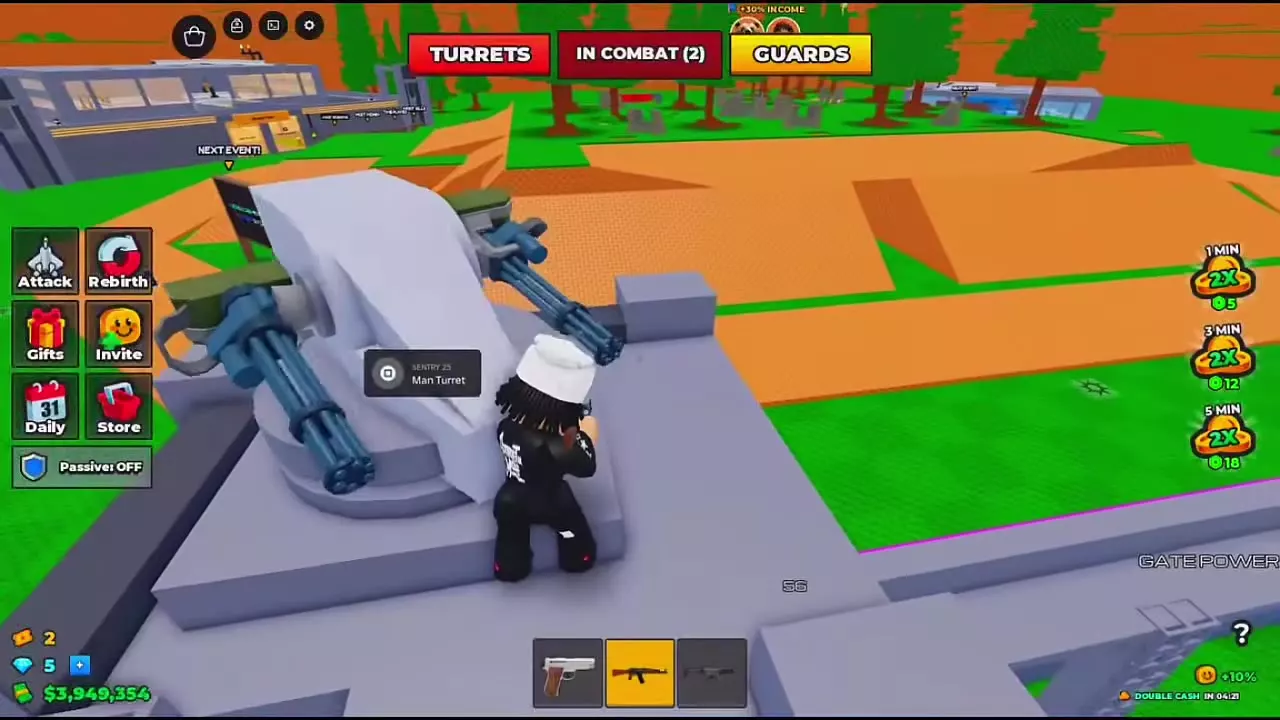
Player beside SENTRY 25 with the square-button Man Turret prompt visible.

Build the Tower and Install the Turret

  1. Find the TURRET TOWER purchase pad on the corner platform connected to the wall walkway. Buy it for $75,000.
  2. Climb the metal ladder on the outside of the corner tower.
  3. Step onto the tower-top TURRET $150K pad to purchase the installation.
  4. Wait for the helicopter to lower the turret onto the tower.

The tower and its turret are separate purchases: buying the tower alone does not complete the installation. If your base displays UNLOCK TURRET TOWER, follow the nearby green arrow toward the unlock area.
Buy a Model, Then Equip It

Open TURRETS at the top of the screen, or use the Turret Terminal in the courtyard beside the glowing gate. The terminal is a black upright post with a cyan-white light on top; approach it and use Open—E on desktop.

To purchase and equip CANNON 40:

  1. Reach Rebirth 2 and have $500,000 cash available.
  2. Select CANNON 40 and choose BUY $500K.
  3. Confirm BUY in the BUY TURRET window. Wait for saving to finish and the model to become OWNED.
  4. Select EQUIP. Check for EQUIPPED and the equipment confirmation.

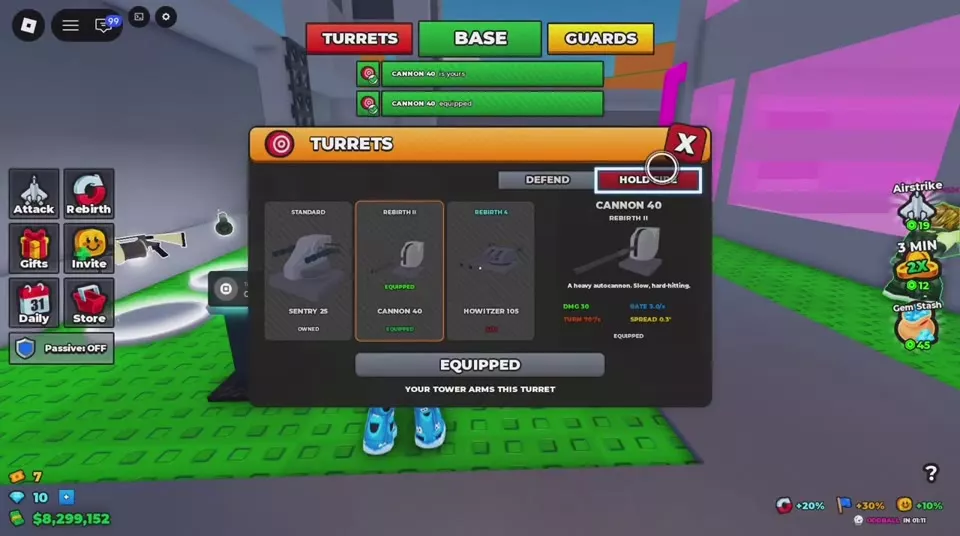
OWNED means purchased; EQUIPPED identifies the model installed on your tower. Equipping CANNON 40 replaces the previous turret, while SENTRY 25 remains owned.

Compare turret models, unlocks, and target choices before spending on a replacement. If the rebirth requirement is blocking your purchase, use the rebirth requirements and unlocks guide.

Use DEFEND and HOLD FIRE

Open TURRETS and find TOWER ORDERS. Select DEFEND to give the defense order or HOLD FIRE to give the stop-firing order, then check which option is highlighted.

Use the highlighted selection to confirm the active order before leaving the menu.

Turret menu with HOLD FIRE highlighted and CANNON 40 marked EQUIPPED.

Aim, Fire, and Exit on Your Device

Climb to an available turret and approach it until Man Turret appears. Activate that prompt to enter the aiming view, turn toward your target, and use FIRE. Use ZOOM for a closer view and EXIT to return to normal character movement.

Device or control view Enter Aim and fire Zoom SWAP Exit
Desktop, SENTRY 25 E at Man Turret Aim toward the target and use FIRE ZOOM control V E
Desktop, view labeled CANNON E at Man Turret Mouse FIRE Z V E
Controller with square-button prompts □ at Man Turret Turn toward the target; R2 to fire L2 R1 □
Touch, SENTRY 25 Activate Man Turret Drag to aim; press the firing button on the right — Two-finger swap gesture Use EXIT

For CANNON 40 fire against another base's rooftop turret, turn toward the roof and zoom in to refine your aim. You can also use a teammate's tower to attack opponents during cooperative defense.

Player beside SENTRY 25 with the square-button Man Turret prompt visible.

Why the Turret Stops Shooting

Check these three things in order:

  1. Equipped model: Open TURRETS and check that your intended model says EQUIPPED. If it only says OWNED, complete the equip step.
  2. Tower order: Check the highlighted order. If HOLD FIRE is active, switch to DEFEND.
  3. Temporary knockout: If TURRET DOWN appears after an attack, wait through the 30-second disabled period. The turret returns automatically with a back online notification.

A BASE UNDER ATTACK warning that identifies your turret means it is being shot; the warning also identifies the attacker. Use that alert to respond before the turret is knocked out. For protecting the rest of your factory alongside the turret, see base defense and Passive Mode.