Reach the Central Flag Platform
Follow the road toward the raised gray stone platform and climb its front steps. The flagpole stands on a circular base inside the low walls. Be ready for other players to contest the point.
Last updated:
The central flag point gives the controlling team an income bonus. Reach the platform, stay near the pole, and watch for your team’s capture notification.
Go to the raised stone platform in the center and stay near the circular base of the flagpole. Wait until your team’s flag rises and the capture banner appears. A white flag marked UNCLAIMED is neutral; read your bonus from the capture notification or flag HUD.
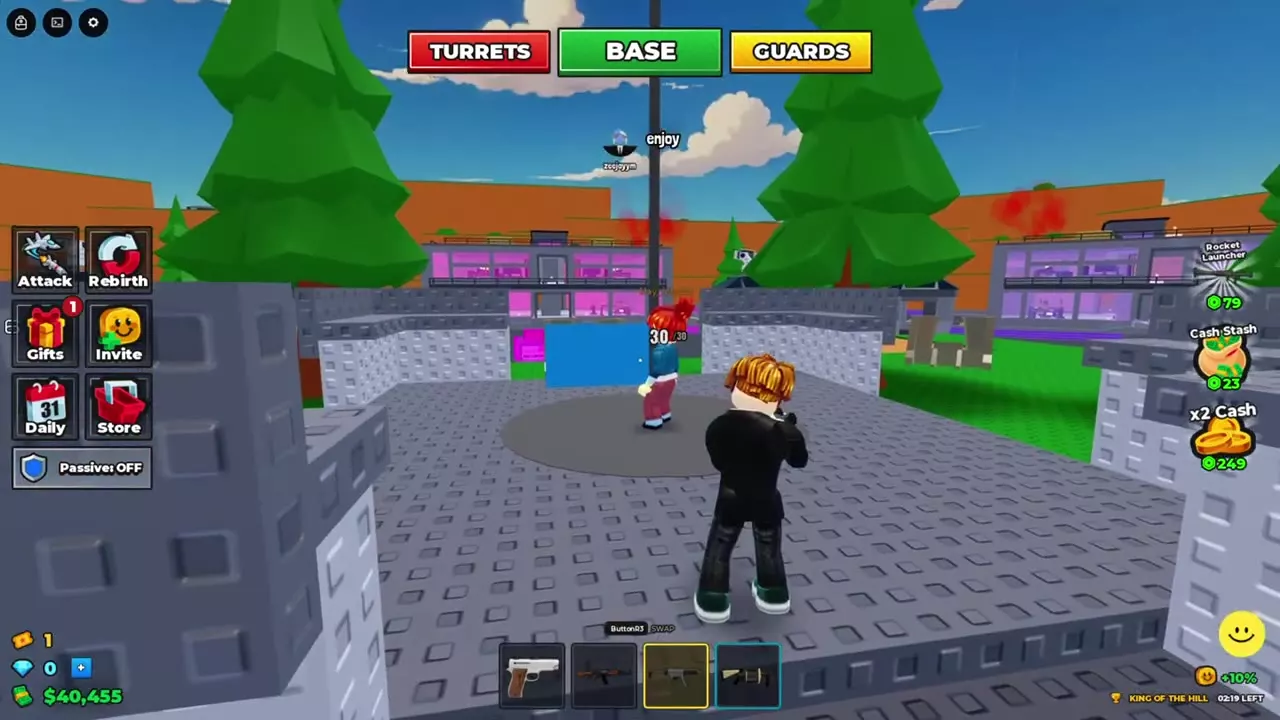
Follow the road toward the raised gray stone platform and climb its front steps. The flagpole stands on a circular base inside the low walls. Be ready for other players to contest the point.
Check the capture notification or the percentage beside the flag icon for your team’s current income bonus. Captures can display +30% or +50%; use the value shown for your capture. The flag HUD can still show the bonus after you return to your factory.
While defending, use the low walls for cover and move to an opening if a wall blocks your aim. During King of the Hill, watch the LEFT countdown to track the time remaining. For more help fighting around cover, see combat tips and weapon choices.