2 Player Raid Tycoon Floor Unlocks and Missing Buttons
Last updated:
Expand upward by buying the structures that reveal each floor’s next purchase pad. If construction progress stalls, check the exterior, stair openings and rooftop facilities, then resolve any ownership or cash requirement.
Quick Answer Overview
Buy Stairs Up for $4,000, then Second Floor for $12,000. For the third floor, buy Third Floor Trusses for $25,000 and Third Floor for $90,000, then climb the central black lattice. The roof purchase chain is Top Floor Walls ($1,000,000) → Roof Trusses ($1,250,000) → The Roof ($1,750,000). To find missing buttons, follow construction arrows outside and upstairs, check rooftop facilities, and use your own side’s pads when NOT YOURS appears.
Build Stairs Up and the Second Floor
Find STAIRS UP on the ground floor inside your factory. Step onto the pad with $4,000 to build the stairs.
Climb to the central stair platform and buy SECOND FLOOR for $12,000.
Follow the stairs on the right of the central platform to enter the second floor.
The UPSTAIRS BELT pad is at the stair exit and costs $7,500 separately. It adds the production conveyor; that price is not the cost of the floor. For the equipment that follows it, use the production and upgrade guide.
Build the Third Floor and Climb the Lattice
Go to the upper stair opening and look between the stairs and the conveyor for THIRD FLOOR TRUSSES.
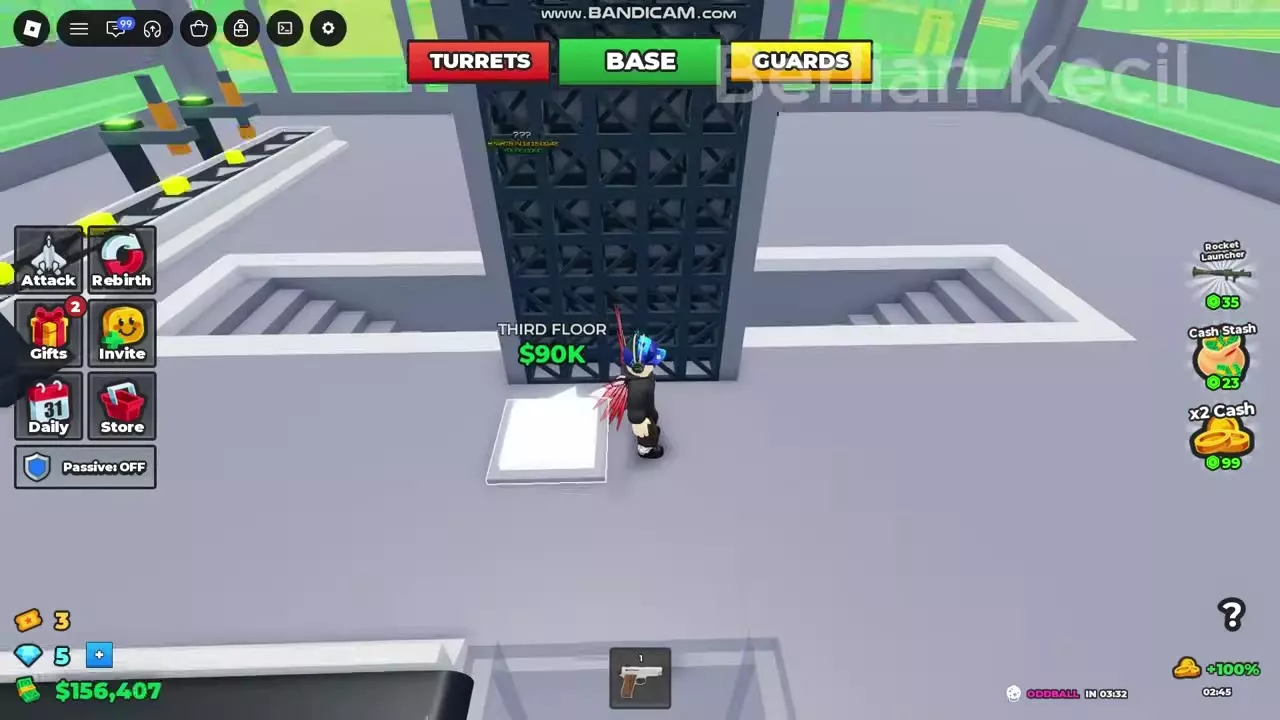
Buy the trusses for $25,000. Dark vertical lattice supports appear, revealing the THIRD FLOOR purchase pad at their base.
Step onto THIRD FLOOR with $90,000. Remain on the pad briefly until construction triggers.
Climb the central black lattice and pass through the floor opening to reach the third floor.
If you are on the perimeter wall’s raised walkway, cross the green-railed connecting platform, pass through the doorway and go around the central stair opening toward the conveyor. The purchase point is at the foot of the supports.
The third floor’s SKY BELT costs $75,000 separately. Buy it when you are ready to add production on this level.
Unlock the Roof Purchase
Buy TOP FLOOR WALLS for $1,000,000 from the white construction pad on the upper floor. The gray walls with green window panels appear, and ROOF TRUSSES becomes available.
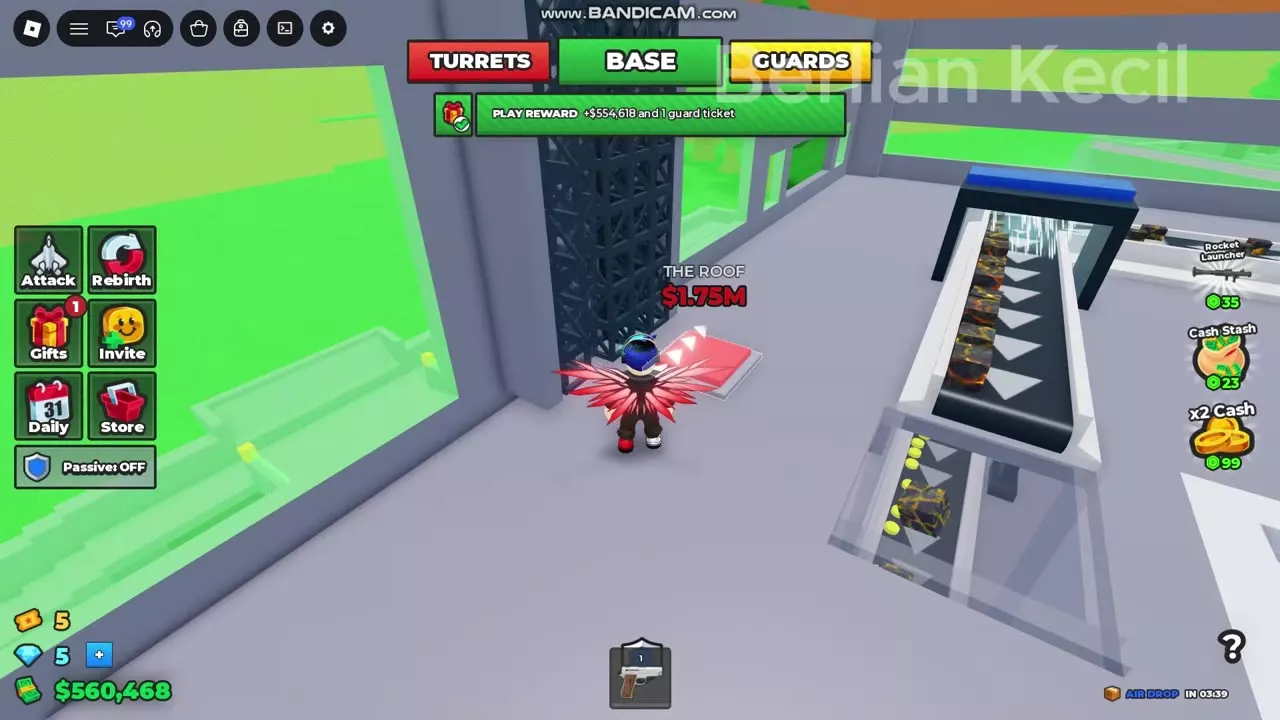
Go to the end of the upper-floor conveyor beside the floor opening. Buy ROOF TRUSSES for $1,250,000 to build the dark lattice roof supports.
Look beside the new supports for THE ROOF, priced at $1,750,000.
If the roof pad has not appeared, work backward through this chain: the walls unlock the trusses, and the trusses unlock The Roof.
Check Exterior, Shared and Rooftop Buttons
Follow the white ground arrows and any green UNLOCK HERE marker. Search beyond the main production room: a completed purchase can reveal another pad nearby.
Check the exterior route
Find PERIMETER WALL beside the exterior doorway; it costs $3,000.
Follow the ground arrow inside the wall to WALKWAYS, beside the three weapon display circles and striped barrier.
Buy WALKWAYS for $4,000 to add the raised wall-side walkway and support framework. This reveals the nearby LASER FENCE pad for $5,000.
Sweep the interior and roof
Stair platforms and floor openings: Look at the base of supports and beside the stairs for newly revealed structural purchases.
Conveyor ends: Check the space around each production line, including the upper-floor end where Roof Trusses appears.
Ground-floor stairs: Look for Loadout Cabinet, priced at $2,500. Its purchase unlocks after the Shotgun.
Rooftop: Check for HELIPAD ($1,500,000), AIRSTRIKE UPLINK ($2,000,000) and ROOF SANDBAGS ($300,000). The Uplink and Sandbags pads are around the helipad area.
NOT YOURS means the button belongs to another player’s side. Move to the corresponding purchase on your own side; this restriction can also appear on the roof.
Some construction buttons are shared. Compare remaining pads and guidance arrows with your teammate, since they may already have completed a shared purchase. For joining and claiming the same factory, see playing with a friend.
Resolve Cash and Rebirth Requirement Blocks
When a visible pad is too expensive
Return downstairs and collect accumulated production cash, then return to the construction pad. If an online reward is ready, open Gifts → Play Rewards and claim it before continuing. See the money and collection guide for collection options and income sources.
At Walkways, the unaffordable pad is red. Once you have $4,000, its price turns green and the pad becomes white and glowing. You still need to step onto it to make the purchase.
When Rebirth still has an unmet requirement
Read the requirements in your current Rebirth menu. Finish any remaining construction, and check named facilities separately from the cash requirement.
If AIRSTRIKE UPLINK says NOT YET, build the $2,000,000 rooftop facility. That entry changes to OWNED once you own it, but you must still meet the menu’s separate cash requirement.
Use the construction target displayed for your current stage; 69 purchases is not a universal completion requirement. Once the building requirements are satisfied, consult the Rebirth requirements and unlocks guide for costs, confirmation and what you keep.