Production

2 Player Raid Tycoon Factory Production and Upgrade Guide

Last updated:

Build your factory from a free manual Dropper into automatic production lines across three floors. Find equipment prices, follow the purchase paths, and learn how to use the rebirth-locked treadmills.

Quick Answer Overview

Build the free Dropper, use Produce at the Console, and collect cash before buying Automatic Dropper and Second Dropper. Expand the second floor with Upstairs Belt ($7,500) and the third floor with Sky Belt ($75,000). Belt and machine upgrades have different prices by floor. Treadmill, Treadmill 2, and Treadmill 3 require Rebirth 1, 2, and 3 respectively; step onto the running belt to use one and jump off to leave.

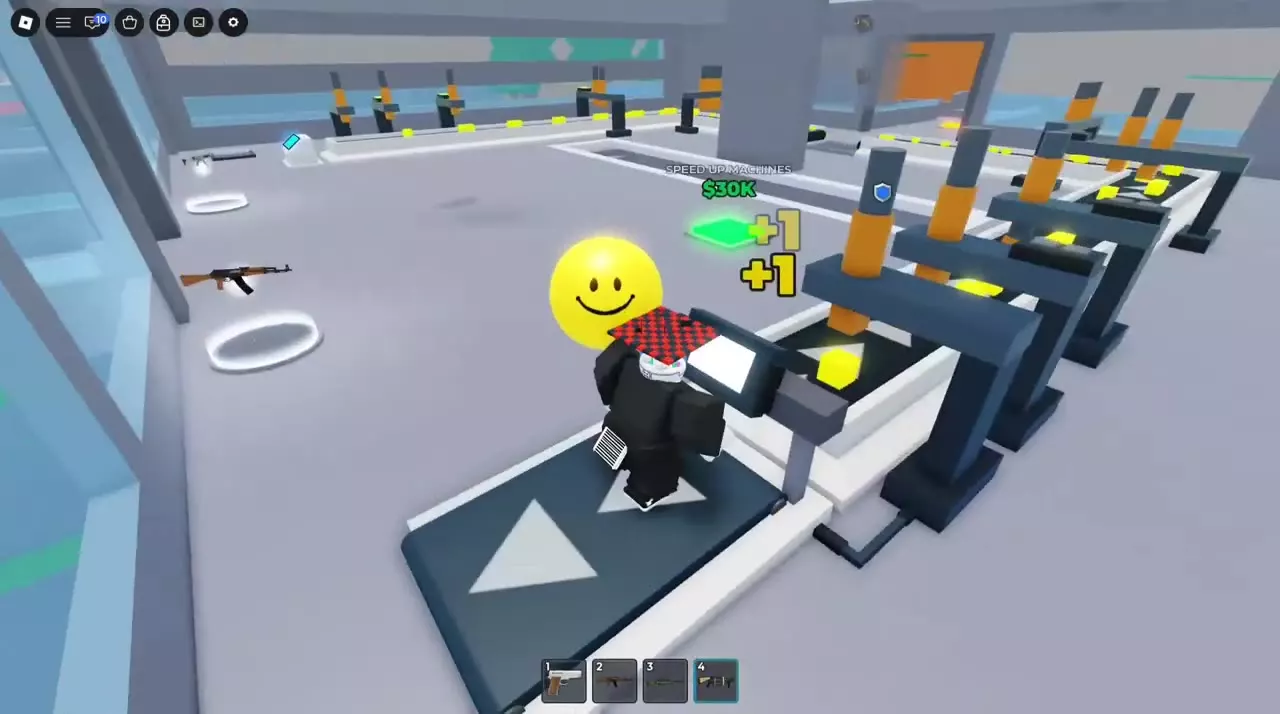
Character running on Treadmill 2's arrow-marked belt beside the upstairs production conveyor.

Production Equipment by Floor

The ground floor starts with manual production and adds automatic droppers. Upstairs Belt opens the second-floor line, while Sky Belt opens the third-floor line. Each conveyor has its own equipment and upgrade purchases.

Use the floor or tier condition beside each price: a ground-floor upgrade and an upstairs upgrade can share a name while costing different amounts. Prices below are in Cash. For stairs, platforms, walls, and other structures, see building and facility locations.

Droppers
NamePriceLocation
Dropper
0 Cash (Starting PLACE DROPPER pad, including rebuilding after rebirth)
Starting production area
Automatic Dropper
30 Cash (Opening production line)
70 Cash (Alternative opening-line price)
Beside the starting Console
Second Dropper
400 Cash
Ground-floor production line
Copper Dropper
4000 Cash
Second-floor conveyor near the stair exit
Heavy Dropper
6000 Cash
Second-floor conveyor
Twin-Barrel Dropper
12000 Cash
Upper conveyor near its corner and window-side walkway
Sky Dropper
30000 Cash
Third-floor Sky Belt line
Forge Dropper
60000 Cash
Third-floor Sky Belt line
Titan Dropper
300000 Cash
Sky-line conveyor; purchase pad across the belt

Dropper

Use
Step on PLACE DROPPER — FREE, then use the Console to produce blocks.
Provides manual production through
Console
Opens the purchase of
Automatic Dropper

Automatic Dropper

Use
Adds automatic production; manual Produce remains available.
Appearance
White and gray machine with a vertical cylinder and a dark top.
Opens the purchase of
Second Dropper ($30 opening route)

Second Dropper

Use
Adds another production device beside the conveyor.
Purchase opens after
Automatic Dropper ($30 opening route)

Copper Dropper

Appearance
Dark gray support frame with an orange-yellow vertical dropping component.
Purchase opens after
Upstairs Belt
Opens the purchase of
Heavy Dropper

Heavy Dropper

Appearance
Gray support structure with a yellow vertical component.
Purchase opens after
Copper Dropper
Opens the purchase of
Twin-Barrel Dropper

Twin-Barrel Dropper

Appearance
Dark support frame with two orange-gray vertical barrels.
Purchase opens after
Heavy Dropper
Opens the purchase of
Hydraulic Press

Sky Dropper

Appearance
Black frame with cyan-white glowing components.
Use
Drops blocks onto the sky-line conveyor.
Purchase opens after
Sky Belt
Opens the purchase of
Forge Dropper

Forge Dropper

Appearance
Black production device with orange glowing components.
Purchase opens after
Sky Dropper

Titan Dropper

Appearance
Black frame with two parallel yellow glowing columns.
Purchase
Cross the conveyor and step onto the green purchase pad when affordable.
Production-Line Processing Devices
NamePriceLocation
Value Scanner
1200 Cash
Ground-floor conveyor corner
Hydraulic Press
25000 Cash
Upper-floor production conveyor
Hydro Chiller
90000 Cash
Sky-line conveyor
Supercomputer
400000 Cash
Production upgrade area beside the sky-line conveyor

Value Scanner

Appearance
A frame spanning the conveyor, built from a cyan purchase pad.

Hydraulic Press

Purchase
Use the purchase pad beside the conveyor to build the press equipment.
Purchase opens after
Twin-Barrel Dropper

Hydro Chiller

Appearance
Black frame with a blue top and a white falling effect inside.
Conveyors and Belt Upgrades
NameTypePrice
Upstairs Belt
Conveyor expansion
7500 Cash
Sky Belt
Conveyor expansion
75000 Cash
Speed Up Belt
Conveyor speed upgrade
300 Cash (Ground-floor first tier)
10000 Cash (Second-floor first tier)
60000 Cash (Sky-line first tier)
150000 Cash (Sky-line follow-up tier labeled Speed Up Belt)
Faster Belt
Conveyor speed upgrade
1500 Cash (Ground-floor line)
25000 Cash (Second-floor line)
Rapid Belt
Conveyor speed upgrade
5000 Cash (Ground-floor line)
50000 Cash (Second-floor line)
Speed Up Belt+
Conveyor speed upgrade
150000 Cash (Sky-line follow-up upgrade)

Upstairs Belt

Location
Second-floor stair exit, near the windows
Appearance
White side rails, a dark arrow-marked belt, and a turning section.
Built on
Second Floor
Opens the purchase of
Copper Dropper
Speed Up Belt (Second-floor $10,000 tier)
Quick Hands

Sky Belt

Location
Third-floor or rooftop production platform
Appearance
White-edged conveyor with a dark arrow-marked surface and a corner section.
Opens the purchase of
Sky Dropper
Speed Up Belt (Sky-line $60,000 tier)

Speed Up Belt

Opens the purchase of
Faster Belt (Ground-floor and second-floor first tiers)
Speed Up Belt+ (Sky-line $60,000 route with a plus-labeled next tier)

Faster Belt

Purchase opens after
Speed Up Belt (Same conveyor line)
Opens the purchase of
Rapid Belt (Same conveyor line)

Rapid Belt

Purchase opens after
Faster Belt (Same conveyor line)

Speed Up Belt+

Purchase
Purchase from the replacement pad after the $60,000 Speed Up Belt upgrade.
Purchase opens after
Speed Up Belt (Sky-line $60,000 tier)
Machine and Manual-Production Upgrades
NameTypePrice
Speed Up Machines
Machine speed upgrade
1500 Cash (Ground-floor line)
30000 Cash (Upper-floor line)
150000 Cash (Higher-cost production tier)
Faster Machines
Machine speed upgrade
6000 Cash (Ground-floor line)
60000 Cash (Upper-floor route following the $30,000 Speed Up Machines upgrade)
80000 Cash (Alternative upper-floor price near the $50,000 Rapid Belt area)
500000 Cash (Higher-cost production tier)
Fast Fingers
Production operation upgrade
120 Cash
Quick Hands
Production operation upgrade
15000 Cash
Lightning Taps
Production operation upgrade
200000 Cash

Speed Up Machines

Opens the purchase of
Faster Machines ($30,000 purchase opens the $60,000 tier)

Fast Fingers

Location
Near the starting Produce Console

Quick Hands

Location
Upstairs production line, near its end and the windows

Lightning Taps

Location
Sky-line conveyor end, beside the orange-yellow glowing machine
Treadmills and Quick Stride
NameTypeRequired RebirthPrice
Treadmill
Treadmill
1 rebirths
—
Treadmill 2
Treadmill
2 rebirths
10000 Cash (Purchase pad available after unlocking)
Treadmill 3
Treadmill
3 rebirths
100000 Cash (Unlocked purchase pad)
Quick Stride
Treadmill-area upgrade
—
15000 Cash

Treadmill

Use
Remain on the arrow-marked running belt to run; jump off to leave.
Appearance
Running belt with white arrows and a front display.
Unlocked through
1 × Rebirth (Rebirth 1)

Treadmill 2

Location
End of the upstairs production line
Use
Step onto the dark running belt and remain there to run; jump off to leave.
Appearance
White base, dark arrow-marked running belt, and a front display.
Unlocked through
2 × Rebirth (Rebirth 2)
Opens the purchase of
Quick Stride

Treadmill 3

Location
Upper production-line end, near the Console
Unlocked through
3 × Rebirth (Rebirth 3)

Quick Stride

Location
Green purchase pad beside Treadmill 2
Purchase opens after
Treadmill 2

Start Manually, Then Add Automatic Droppers

  1. Claim a factory side and follow the floor arrows to PLACE DROPPER — FREE. Step on the pad to build the starting equipment and conveyor.
  2. Approach the Console and repeatedly use Produce. On desktop, press E or use the indicated CLICK! button; on mobile, use TAP.
  3. Let the blocks travel along the conveyor, then step on the green COLLECT! pad to move the accumulated income into your spendable cash balance.
  4. Buy Automatic Dropper from its pad beside the Console. The opening price can be $30 or $70; use the price displayed on your pad.
  5. On the $30 opening route, Automatic Dropper reveals Second Dropper for $400. Buy it to add another production device.

Prioritize Automatic Dropper early so production can continue while you move around the factory, then expand with Second Dropper. The original Console remains usable after automation, so you can keep producing manually while saving for another purchase.

Ground-floor purchases also include Value Scanner ($1,200), which builds a frame across the conveyor, Fast Fingers ($120) near the Console, and Speed Up Belt ($300). Add early walls and entrance protection alongside production expansion; the base defense guide covers where to build them.

After a rebirth reset, the starting Dropper is free again. Use Produce to restart the line and earn cash for automation.

Expand the Upstairs and Sky Production Lines

Second-floor purchase path

Build and reach the second floor before buying its production line. Find Upstairs Belt ($7,500) near the stair exit and windows. Buying it creates the conveyor and opens Copper Dropper, the second-floor Speed Up Belt upgrade, and Quick Hands.

Follow the equipment path:

  1. Buy Copper Dropper ($4,000) to open Heavy Dropper.
  2. Buy Heavy Dropper ($6,000) to open Twin-Barrel Dropper.
  3. Buy Twin-Barrel Dropper ($12,000) to open Hydraulic Press.
  4. Buy Hydraulic Press ($25,000) from the pad beside the conveyor.

The three upstairs droppers cost $22,000 combined, excluding Upstairs Belt, Hydraulic Press, and the floor itself. Budget for access and the conveyor separately when planning this expansion.

Third-floor Sky line

Once the third-floor platform is built, climb the central frame to reach it.

  1. Buy Sky Belt ($75,000) to create the new conveyor.
  2. Buy Sky Dropper ($30,000) to start the line and open Forge Dropper.
  3. Buy Forge Dropper ($60,000) from its production pad.

A practical continuation is Hydro Chiller ($90,000) followed by Titan Dropper ($300,000) as their pads become available. Find Titan's purchase pad across the conveyor; its machine has two parallel yellow glowing columns. Supercomputer ($400,000) is another purchase beside the Sky-line conveyor.

If you cannot reach the production platform yet, follow the floor unlock route for the required structures and climbing directions.

Upgrade Belts, Machines and Manual Input

Conveyor upgrade paths

On both the ground and second floors, buy Speed Up Belt → Faster Belt → Rapid Belt on the same conveyor. Each purchase reveals the next upgrade. Use the floor-specific prices in the equipment directory.

On the Sky line, buy the $60,000 Speed Up Belt, then the $150,000 follow-up upgrade. That follow-up can be labeled Speed Up Belt+ or Speed Up Belt.

Choose the upgrade for the job

  • Speed Up Machines and Faster Machines are machine-speed purchases. On the upper-floor $30,000 Speed Up Machines route, the purchase reveals Faster Machines at $60,000. A separate upper-floor price variant is $80,000 near the $50,000 Rapid Belt area, so budget from the pad you are using.
  • Fast Fingers, Quick Hands, and Lightning Taps are operation upgrades near the manual-production areas. Look near the starting Console for Fast Fingers, near the upstairs line's end and windows for Quick Hands, and at the Sky-line conveyor end for Lightning Taps.
  • Value Scanner, Hydraulic Press, Hydro Chiller, and Supercomputer are separate production-line purchases. Follow their own pads and prerequisites when expanding the equipment along a conveyor.

For a new factory, getting automatic production running is a useful first priority because it reduces the need to stay at the Console. After that, decide whether you are opening another line, upgrading an existing line, or spending time on manual production; those are different purchases rather than one universal upgrade sequence.

Make sure you buy the intended tier

Step onto the purchase pad itself. A pad turning green as your balance rises means it has become affordable; it does not buy the upgrade automatically. If approaching a pad does not trigger the purchase, step away and back onto it.

Read the replacement label after a purchase. For example, buying Speed Up Machines for $30,000 can replace that pad with Faster Machines for $60,000. If you remain on the new pad without enough cash, Not enough cash can appear even though the first upgrade succeeded. Move off the pad and save or collect enough cash for the newly displayed tier.

Unlock and Use Treadmills

The first Treadmill requires Rebirth 1. Treadmill 2 requires Rebirth 2 and costs $10,000 at the end of the upstairs production line. Treadmill 3 requires Rebirth 3 and costs $100,000 near the upper production-line end. Reaching the required rebirth unlocks the purchase; you still need to buy the available machine.

  1. Step onto the treadmill's purchase pad once you meet its requirement and have enough cash.
  2. Walk onto the dark, arrow-marked running belt in front of its display.
  3. Remain on the belt while your character runs.
  4. Jump off to leave.

Buying Treadmill 2 also reveals Quick Stride, a separate $15,000 purchase beside it.

The nearby E / Produce prompt belongs to the separate Console. Use the treadmill by stepping onto its running belt. If you need another rebirth to unlock it, see the rebirth requirements and reset rules before resetting your factory.

Character running on Treadmill 2's arrow-marked belt beside the upstairs production conveyor.

Collect Income and Continue Building

The amount stored at the collection terminal is separate from your spendable balance. Before returning to an unaffordable upgrade, step on the green pad beneath the cash display to collect your factory income.

Buy Auto Collect for $25,000 from the pad beside the ground-floor collection terminal to remove repeated collection trips. The terminal displays AUTO after activation, and factory income enters your balance automatically. This is especially useful when you are working upstairs or leaving the factory.

For other ways to fund purchases, see the cash sources and income guide. To open more building space or locate an unfinished construction purchase, follow the floor unlocks and missing buttons guide.