Unlock and Buy the Cabinet
- Unlock the Shotgun to reveal the Loadout Cabinet purchase.
- Find the purchase pad near the stairs on your factory’s ground floor and buy the cabinet for $2,500 cash.
- Approach the cabinet and use Open. On desktop, press E.
Last updated:
The Loadout Cabinet lets you choose owned guns to carry when you respawn. Buy it at your factory, then assign weapons to its available CARRYING slots.
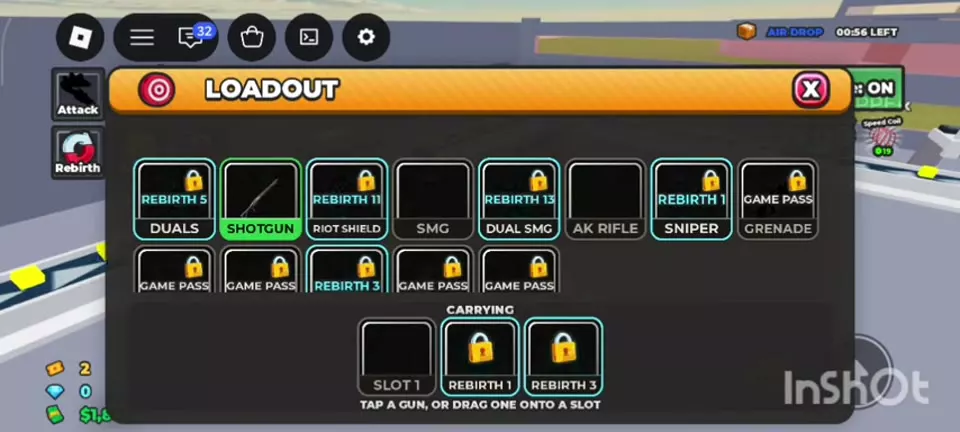
Unlock the Shotgun, then buy the Loadout Cabinet near the ground-floor stairs for $2,500 cash. Open it and assign owned guns to CARRYING. You start with one slot, unlock a second at Rebirth 1, and unlock a third at Rebirth 3. Saved guns return after ordinary death; Rebirth is a separate reset.
In the LOADOUT menu, click a gun or drag it into an unlocked CARRYING slot. The guns assigned there are the ones you respawn with after ordinary death.
If the menu says you do not own a gun, buy it at its giver first. Opening a slot does not give you the weapon. For example, you can save an AK Rifle and a Sniper in two slots if you own both. See the weapon catalog for acquisition requirements, or the combat guide for help choosing weapons for different situations.
| Completed rebirths | Saved CARRYING slots |
|---|---|
| 0 | 1 |
| 1–2 | 2 |
| 3 or more | 3 |
The second slot unlocks at Rebirth 1 and the third at Rebirth 3. These are saved respawn slots; the number of guns temporarily shown in your hotbar is separate. For the requirements and reset details, see the Rebirth guide.
After an ordinary death, your saved CARRYING guns return when you respawn. If a gun was not saved and is missing from your hotbar, return to its giver to collect it again. A permanent giver unlock, such as a permanently unlocked Rocket Launcher, lets you collect that weapon again; owning it and currently carrying it are separate.
Rebirth is different from ordinary death. Its reset menu includes guns among the items that restart, so the cabinet’s ordinary respawn rule should not be treated as a Rebirth retention rule.